

Brief Overview
An AI-assisted layout correction feature inside Adobe Express that helps non-designers transform cluttered edits into clean, shareable visuals, making everyday design faster, clearer, and more confidence-driven.
AI-Assisted Design
Layout Intelligence
UX for Non-Designers
Creative Confidence
😖
Menus That
Break Daily
In a local WhatsApp food community, home chefs updated their menus every single day. But repeated edits slowly ruined the layouts, text became crowded, spacing broke, and posters lost visual clarity.
💡
From Editing
to Repair
I realised the problem wasn’t creating posters - it was maintaining them. Templates looked good initially, but non-designers struggled to preserve hierarchy, balance, and readability while updating content daily.
🎯
LayoutIQ
Takes Shape
An AI-powered feature inside Adobe Express that detects broken layouts and intelligently fixes them. From spacing to alignment, LayoutIQ helps users turn messy edits into polished, shareable designs in a single tap.
The spark where it all began
The idea emerged from observing a hyperlocal food-selling community in my neighborhood. A WhatsApp group connected home chefs with nearby customers, where women posted daily food menus every morning. While the food was excellent, the visual communication often became a challenge.
One recurring issue stood out:
Creating and updating menu posters every day was exhausting, especially for users with little design experience.
A regular seller I ordered from mentioned how difficult it was to:

Most users relied on basic editing tools but lacked confidence in visual design principles like hierarchy, spacing, alignment, and composition.
This became the starting point for the project.
A problem hidden in the plain sight
Non-designers can create designs using templates, but struggle when modifying them.
Small edits often break the visual structure:
-
Text overlaps
-
Alignment becomes inconsistent
-
Colours lose contrast
-
Visual hierarchy collapses
-
Layouts appear crowded and unprofessional
As a result:
-
Users spend more time fixing designs than creating them
-
Templates lose their intended quality
-
Many users abandon designs midway
-
Creators hesitate to share their work publicly
Opportunity Area
Most design tools focus heavily on:
“Helping users create.”
Very few focus on:
“Helping users recover from broken layouts.”
This project explores an AI layer that acts like a silent design assistant:
Detecting layout issues
Explaining problems visually
Auto-correcting compositions
Maintaining user intent while improving structure
The layout always needed the
Fix this Issue
magic button.
Context of Use
Primary Users



Home chefs
Small business owners
Local Sellers
Students
Rural creators
Common Platforms



WhatsApp Status
WhatsApp Groups
Instagram Stories
Telegram Communities
Facebook Marketplace
Core Insight
Templates solve creation.
Users struggle with modification.
The issue was not “lack of templates.”
The issue was "Users unknowingly break visual systems while editing."
How might we
help non-designers repair broken layouts without needing design knowledge?
Introducing
LayoutIQ
One-Click Smart Layout Fixing
LayoutIQ
One-Click Smart Layout Fixing
/
An AI-powered assistant integrated inside Adobe Express that:
-
Detects visual design issues
-
Suggests improvements
-
Automatically reorganizes layouts
-
Generates cleaner shareable outputs
The system does not redesign from scratch.
Instead,
Preserves the user’s content and intent while improving visual structure.
Feature Flow

Layout Refined Successfully
Step 5
Explore Smart Variations
Step 6
Confirm Your Selection
Step 7
Ready to Share
Step 8
The selected fixes have been applied and the layout has been visually improved for better readability and balance.
Users can either undo the changes to return to the previous version or explore additional layout variations generated by the AI.
Users can preview different AI-generated layout styles like Minimal, Balanced, or Bold to choose the version that best matches their content and visual preference.
The selected layout style is now ready to be applied.
Users can save the updated design or go back to explore other layout variations.
The layout has been refined into a clean, visually balanced design that is polished, readable, and ready to publish instantly.
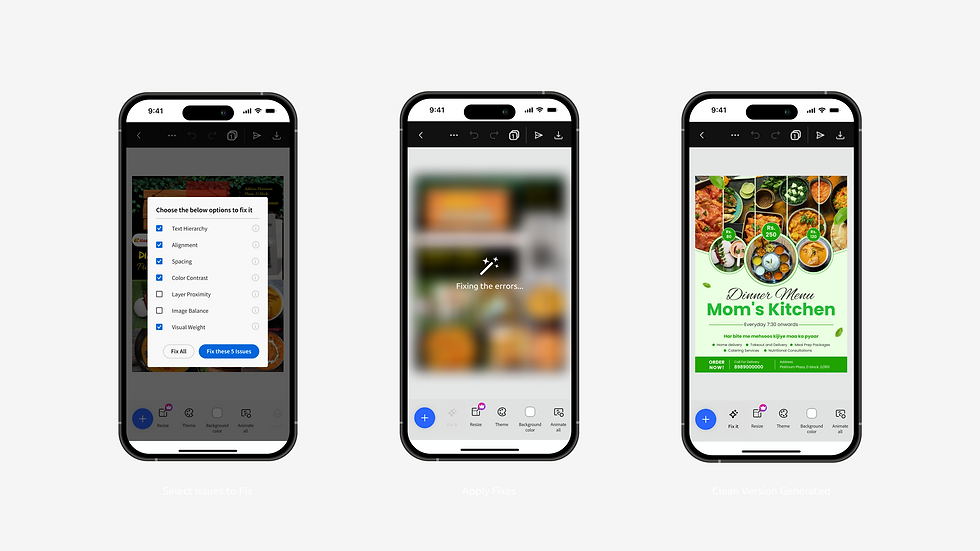
Auto-Fix or Selective Fix
Step 4
AI fixing the Layout
Step 5
Polished Output
Step 6
Users can:
-
Fix all issues instantly
-
Select individual corrections
-
Compare before/after versions
-
Explore multiple style variants
The AI begins resolving the user-selected issues by reorganising spacing, alignment, hierarchy, and visual balance to create a cleaner and more polished layout.
The design becomes:
-
Cleaner
-
Better aligned
-
Easier to read
-
More visually balanced
-
Ready to share instantly

User Creates or Edits a Poster
Step 1
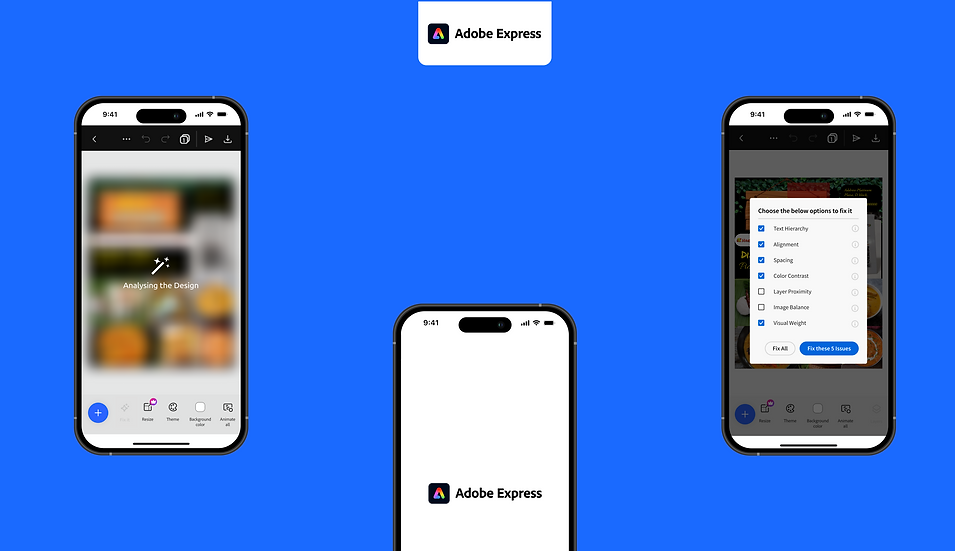
AI Analyses the Layout
Step 2
Problems identified on Canvas
Step 3
Users freely edit templates:
-
Add menu items
-
Change prices
-
Upload food photos
-
Increase text size
-
Rearrange content
This often results in cluttered layouts.
The AI scans the design and identifies:
-
Alignment inconsistencies
-
Poor spacing
-
Weak hierarchy
-
Color contrast issues
-
Imbalanced visual weight
-
Layer proximity problems
The analysis appears as visual annotations on the canvas.
The AI detects multiple layout issues within the poster and prompts users to either review and fix the identified problems or dismiss the suggestions and continue editing manually.
Key UX Decisions
AI as Assistance, Not Replacement
The system avoids fully generating designs.
Instead:
-
The user remains in control
-
AI acts as a co-pilot
-
Existing creative ownership is preserved
Progressive Transparency
Rather than “magically changing” layouts, the AI:
-
Shows detected problems
-
Explains improvements visually
-
Builds user trust gradually
Low-Learning Curve
The feature is designed for users unfamiliar with:
-
Design terminology
-
Typography systems
-
Layout grids
-
Visual hierarchy
Everything is simplified into actionable fixes.
Design Principles Behind LayoutIQ
Invisible Intelligence
AI works quietly in the background.
Confidence Building
Users feel capable rather than intimidated.
Repair over Recreation
Improving existing work instead of replacing it.
Human Intent Preservation
The original content and emotion remain intact.
Impact Metrics
User Experience
-
Reduced editing time
-
Faster publishing
-
Lower abandonment rates
-
Increased confidence
Business Impact
-
Higher retention
-
Increased repeat usage
-
Better template engagement
-
More exports/shares
-
Improved conversion to premium tools
“A single tap that brings Adobe Express closer to its mission,
creativity made easy for everyone.”