
Frame 1
Resident in Flat 204 notices a leak.

Frame 2
Resident raises plumber request.

Frame 3
Request Received by Manager

Brief Overview
A multimodal facility management system that connects residents, managers, and helpers through gestures, voice, and space all in one seamless loop.
Multimodal Interaction
Spatial Interface Design
Service System Thinking
Real-World Representation

😖
Everyday
Chaos
Endless calls, mixed-up registers, and late helpers; managing society issues had become a guessing game. Transparency was missing, and trust kept slipping.
💡
The
Realisation
It wasn’t the work that failed, it was the communication loop. Everyone was doing their part, but no one could see the whole picture.
🎯
Building the Bridge
Setu connects residents, managers, and helpers through one multimodal system - log, assign, and track every request, seamlessly and transparently.


“A facility management system that promotes glanceable information
and real-life visual representation of spaces - enabling effortless
assigning, monitoring, and managing.”
...

The Problem
In most societies today, residents report maintenance issues - like plumbing or electrical faults by directly calling the staff or the maintenance office. While this works for isolated cases, the system quickly breaks down when multiple requests come in at once. There is no centralised log, so tasks get lost or duplicated, no transparency for residents to know if their complaint is being addressed, and no efficient way for managers to allocate staff based on priority or availability. This leads to delays, frustration, and a complete lack of records for future planning or preventive maintenance.


“How might we
design a multimodal system that makes facility management more transparent, efficient, and intuitive for residents, managers, and helpers?”
...
Our solution
A multimodal facility management system that replaces manual controlling with natural, intuitive interactions.
Residents raise service requests through an app or voice input, which appear instantly on a large interactive screen in the manager’s office.
The manager navigates a 3D real-world representation of the society not by menus or buttons, but through gestures, speech, and touch — rotating the space, zooming into flats, and assigning staff seamlessly.
Helpers receive real-time mobile notifications with task details, update their progress, and mark completion, while residents are informed once their issue is resolved.
By combining voice, gesture, and visual interaction, the system creates a clear, fast, and transparent loop between residents, managers, and helpers.

The value isn’t in replacing a phone call, it’s in scaling up to handle multiple requests, staff allocation, accountability, and transparent communication for communities, organisations, or institutions.
Actors in the Loop

Task Flow ( Loop )

Use Case
Frame 4
Manager assigns plumber via drag-drop/gesture

Frame 5
Plumber receives and accepts task.

Frame 6
Confirmation notification from plumber.

Frame 7
Resident receives confirmation from system.

Frame 8
Plumber doing the repair.

Frame 9
After finishing, plumber updates completion status.

Frame 10
Resident confirms completion.

Frame 11
System updates records automatically.

A comparison between manual system & SETU
Aspect
Manual System
SETU
Speed of Assigning
Slow ( calls, registers, manual tracking )
Fast ( gesture, speech, drag-drop in seconds )
Ease of Use
Low ( needs memory, paperwork )
High ( natural gestures, voice, touch )
Spatial Awareness
None ( text-only, no visual context )
Strong ( 3D model, rotate/pan with gestures )
Cognitive Load
High (manager must remember everything)
Low (system provides glanceable visual + audio feedback )
Transparency
Low ( residents unsure if task assigned )
High ( clear updates to manager, helper, resident )
Scalability
Poor ( collapses with multiple requests )
Excellent ( parallel handling of multiple requests )
How will SETU help?
Faster & More Natural Interactions
Accessibility for All Users
Better Spatial Awareness
Reduced Cognitive Load
Transparency & Trust
Scales to Complex Situations
A multimodal system makes facility management faster, easier, and more natural; it reduces friction, improves accessibility, and builds trust through a transparent feedback loop.
Core Interactions in the Multimodal System
TASK 1
Monitoring the 3D Society Layout with Gestures
TASK 2
Assigning maintanence requests
...
Introducing

Walkthrough of UI


The manager interacts with the digital twin of the society using natural gestures.
This gives the manager spatial awareness of where issues are located and how resources are distributed.

This task highlights the immersive navigation experience.
Rotate the model clockwise/anticlockwise, pan across blocks, or zoom in/out on flats.
By replicating real-world movement, the system makes exploration intuitive and engaging compared to traditional lists or dashboards.

Modalities in TASK 1
Activation of the 3D Layout for interaction

Panning the space in Clockwise & Anticlockwise direction

Activation of 3D Space
This gesture marks the beginning of the interaction.
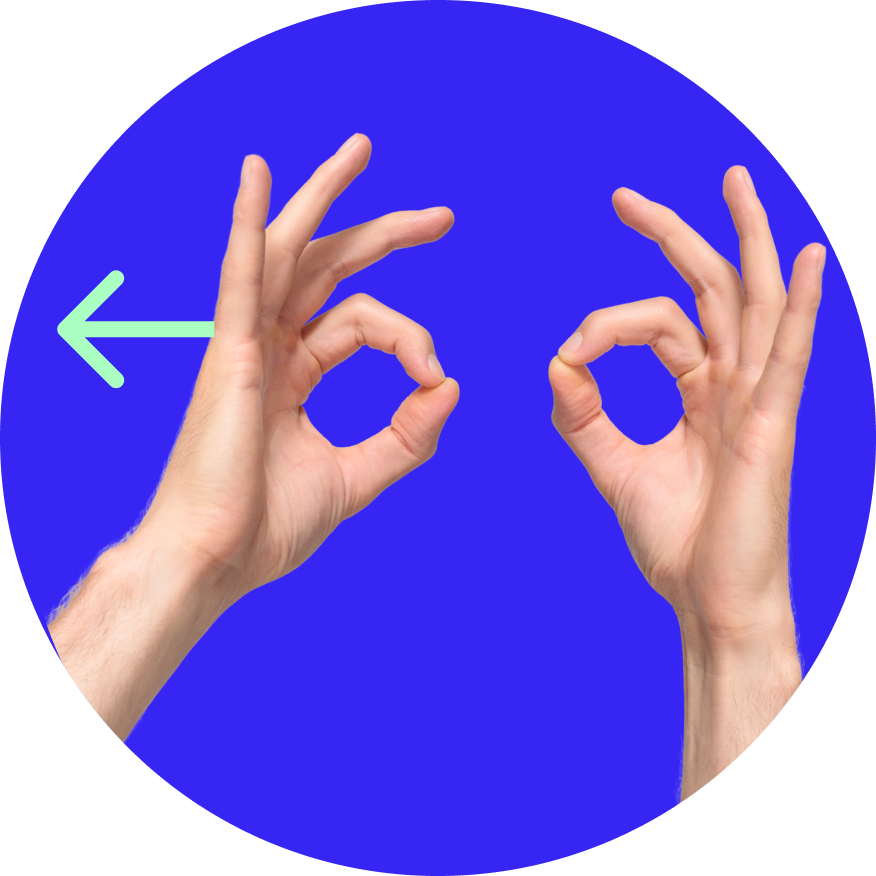

Moving - Clockwise & Anticlockwise direction
Right hand - To hold the space
Left hand - To move the space (clockwise and anti-clockwise)

Panning the space Top and bottom

Moving the space - top and bottom.
Isometric/Perspective view
Right and left hand - Moving both hands simultaneously to see the space.
Zoom In and Zoom Out
Movement - Zoom in and out
Zooming in to a particular space to have a close up view.
Zooming out to have an arial view.


A request appears as a marker on the 3D society model.
The helper instantly receives a notification on their mobile device with task details.
This task demonstrates how a resident’s maintenance request flows seamlessly into the system.
The manager can assign staff multi-modally by drag-and-drop, gestures, or speech commands.
This closes the loop quickly, replacing repeated phone calls with a fast, transparent, and visual process.
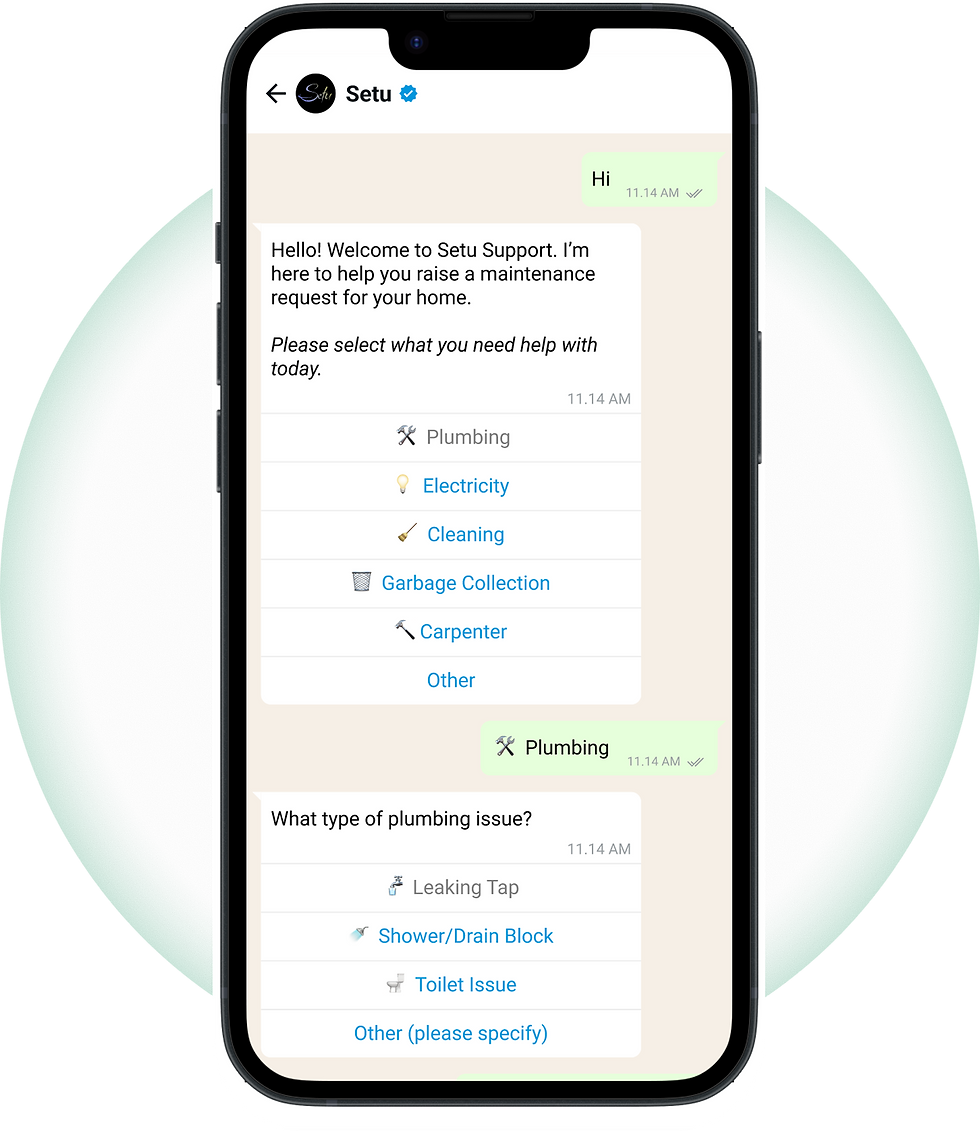
Complaint raised by resident through Whatsapp


Modalities in TASK 2
Modality
Audio Feedback
Request Received in the System as an audio notification

Manager comes in the proximity, the requests opens on the screen with audio readout
Modality
Proxemics, Visual, Audio

Manager sees the request and give audio command to open floor plan of the particular block
Modality
Audio

Displays the detailed floor plan of the block and floor linked to the request
Modality
Visual

Selection of Plumber to assign with open palm gesture
Modality
Gestural, Visual

Grabbing & moving the selected plumber card onto the flat
Modality
Gestural, Visual

Assigning the plumber to the flat
Modality
Gestural, Visual

Plumber assigned to the flat
Modality
Gestural, Visual

Confirmation of Plumber assigned to the flat
Modality
Audio

Hand Wave gesture to go back to homescreen
Modality
Gestural

Back to homescreen

Technology Stack for Setu
1. Computer Vision for Gesture Recognition
Input
Standard CCTV/IP cameras installed in community offices.
Processing
Computer vision models process live video feeds to detect hand and body landmarks.
Framework
OpenCV - Enable recognition of predefined gestures such as:
Open palm → selection.
Closed fist → grab and hold.
Hand movement → drag and pan.
Rotational motion → rotate 3D model.
Outcome
Managers interact naturally with the 3D society model without relying on additional hardware such as Kinect sensors.
2. Speech Recognition and Natural Language Processing
Automatic Speech Recognition (ASR)
Captures spoken commands through a microphone system.
Natural Language Processing (NLP)
Interprets intent (e.g., “assign plumber to A/201”) and extracts entities such as role, flat number, or time.
Outcome
Hands-free control for quick and inclusive task assignment.
3. Interactive Display Interface
Hardware
Large interactive screen in the community management office.
Visualisation
Society layout is replicated using 3D rendering tools
Interaction Layer
Gesture input processed via CV.
Voice commands through ASR.
Touch/mouse as a fallback for manual control.
Outcome
Provides a real-world digital twin of the society for visual navigation and task allocation.
4. Backend Infrastructure
Database
Centralized storage of residents, flats, requests, staff details, and assignments.
Server
Local community server or cloud-hosted backend to process requests and assignments.
5. Resident Interaction and Notifications
Request Logging
Residents raise complaints through WhatsApp chatbot, with options to add images and messages.
Helper Notifications
Local community server or cloud-hosted backend to process requests and assignments.
Feedback Loop
Task status updates flow back to residents (e.g., “Assigned,” “In Progress,” “Completed”)
6. Feedback and Confirmation
Visual Feedback
Request markers on the 3D layout change status colours (red → yellow → green).
Audio Feedback
Text-to-Speech confirms task assignments aloud (e.g., “Plumber assigned to A/201”).
“The thinking behind the tech - how we built the backbone of Setu.”
Action with Gestures - Visual input Modality
We explored multiple technologies to enable gesture-based, multimodal interaction that works with existing community hardware - focusing on cost, adaptability, and accuracy.
Input Technology Evaluation
Goal:
Enable gesture, motion, and depth tracking using standard cameras.
CRITERIA
Cost
Portability
Finger Gesture Accuracy
Setup Complexity
Cross-Platform
Feedback
Tracking Accuracy
Depth Accuracy

Very Low
Very High
Excellent
Easy
All
Excellent
High
Infrared

High
Medium
Moderate
Complex
Windows first
High
Excellent
True Depth

Medium
Medium
Moderate
Medium
Mostly
Moderate
Excellent
True Depth

Low Medium
Very high
Excellent
Easy
All
Excellent
Excellent
Limited Cone
Why OpenCV?
Lightweight, accurate, and works with regular cameras, no special sensors required.
Ideal for community-scale setups.
Output Technology Evaluation
Goal:
Choose a real-time 3D rendering platform compatible with OpenCV.
Factor
OpenCV Compatibility / Adaptability
Adaptability to Existing Systems
Flexibility / Customization
Ease of Coding / Integration
Real-Time Gesture Interaction
Performance (3D + Gestures)
Support / Documentation
Cost / Open
Platform

Excellent
Excellent
Excellent
High
High
Moderate
High
Excellent

Moderate
High
Excellent
High
High
High
Excellent
Moderate

Moderate
High
Excellent
Moderate
High
Excellent
Excellent
Low

Moderate
High
High
Moderate
Excellent
High
High
Moderate
Why Blender?
Open-source, Python-friendly, and easily integrates with OpenCV for real-time visuals.
Final Tech Combination
Goal:
Choose a real-time 3D rendering platform compatible with OpenCV.
Capture
Detect & track gestures

+

Processing
Map gesture data to actions

+

Render
Display results in real-time 3D
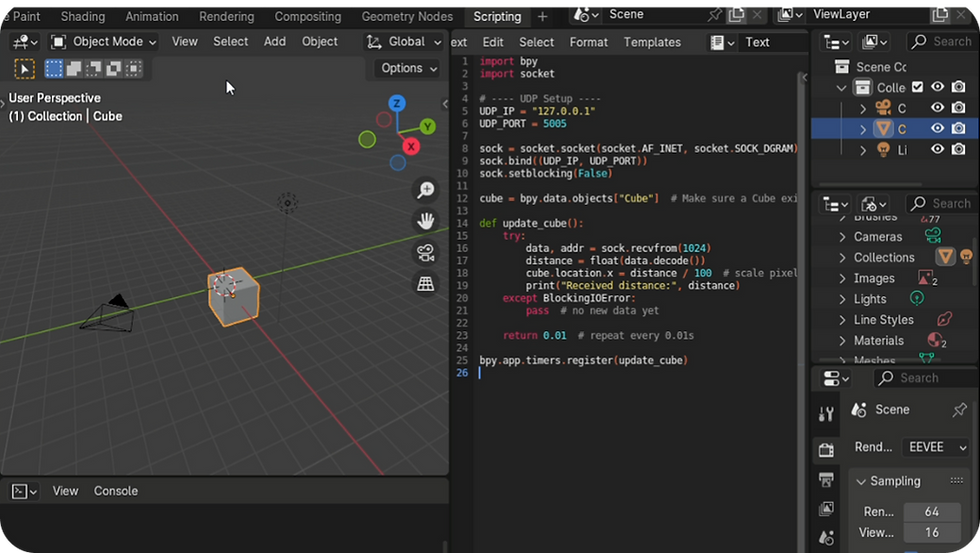
Open CV detection of gestures, line distance

Proximity test with webcam


Experiments on multiple person detection

Blender interface with Realtime render viewport and Coding terminal
Conclusion
Facility management in housing societies has long been burdened by missed calls, unclear communication, and lack of accountability. Residents are left frustrated, managers overwhelmed, and helpers confused.
Setu addresses this gap by offering a multimodal facility management system that is fast, transparent, and intuitive. With its ability to replicate the society in a 3D real-world model and allow control through gestures, voice, and touch,
Setu transforms the way requests are assigned, monitored, and resolved.
Key benefits

Future Scope of SETU
While the current scope of Setu focuses on facility management at the community level, the underlying framework of multimodal interaction with 3D spatial models has the potential to extend into multiple domains:
Predictive Maintenance
Using request histories and data analytics to identify recurring problems and prevent failures before they occur.
Scalability Across Contexts
Beyond residential societies, Setu can be implemented in hospitals, educational campuses, corporate parks, and government facilities.
Architectural Presentations & Urban Planning
-
The same multimodal 3D interaction system can be repurposed for architects and planners to present their designs.
-
Gestures, voice, and touch controls would allow them to rotate, zoom, and explore designs intuitively during client presentations, making the process more immersive and engaging.
Reflection
Through Setu, we explored the power of multimodal interaction in simplifying complex tasks. By combining gestures, speech, and visual representation, the system reduces cognitive load and feels more natural than traditional dashboards. This project reinforced how human-centered, multimodal design can make management systems more engaging, efficient, and trustworthy.
...
Setu is more than a tool - it is a bridge that connects residents, managers, and helpers into a single seamless system.
“Setu – “Seamless connections, smooth solutions”